BigQuery Streaming Inserts vs. Storage Write API
Choose the Storage Write API for new projects: it delivers exactly-once semantics and lower costs.

BigQuery Streaming Inserts vs. Storage Write API
Legacy streaming inserts (tabledata.insertAll) and the Storage Write API (gRPC) are not two versions of the same thing, but two fundamentally different architectural approaches. The choice between them comes down to concrete tradeoffs in delivery guarantees, cost, throughput, and protocol, and understanding those differences gives practitioners a clear decision framework for their specific ingestion requirements.
Why BigQuery offers two different streaming paths
The legacy path routes data through a streaming buffer; BigQuery merges the buffer with columnar storage at query time, adding overhead. The Storage Write API writes directly to BigQuery's storage layer with no buffer intermediary, and Google's own documentation explicitly recommends it for new projects over the REST path. The protocol difference matters more than it sounds: legacy uses REST/JSON, while the Storage Write API uses gRPC with Protocol Buffer or Apache Arrow wire formats, and serialization overhead drops substantially. This architectural split is the root cause of every downstream difference in cost, delivery guarantee, throughput, and schema handling covered below.
The four stream types in the Storage Write API
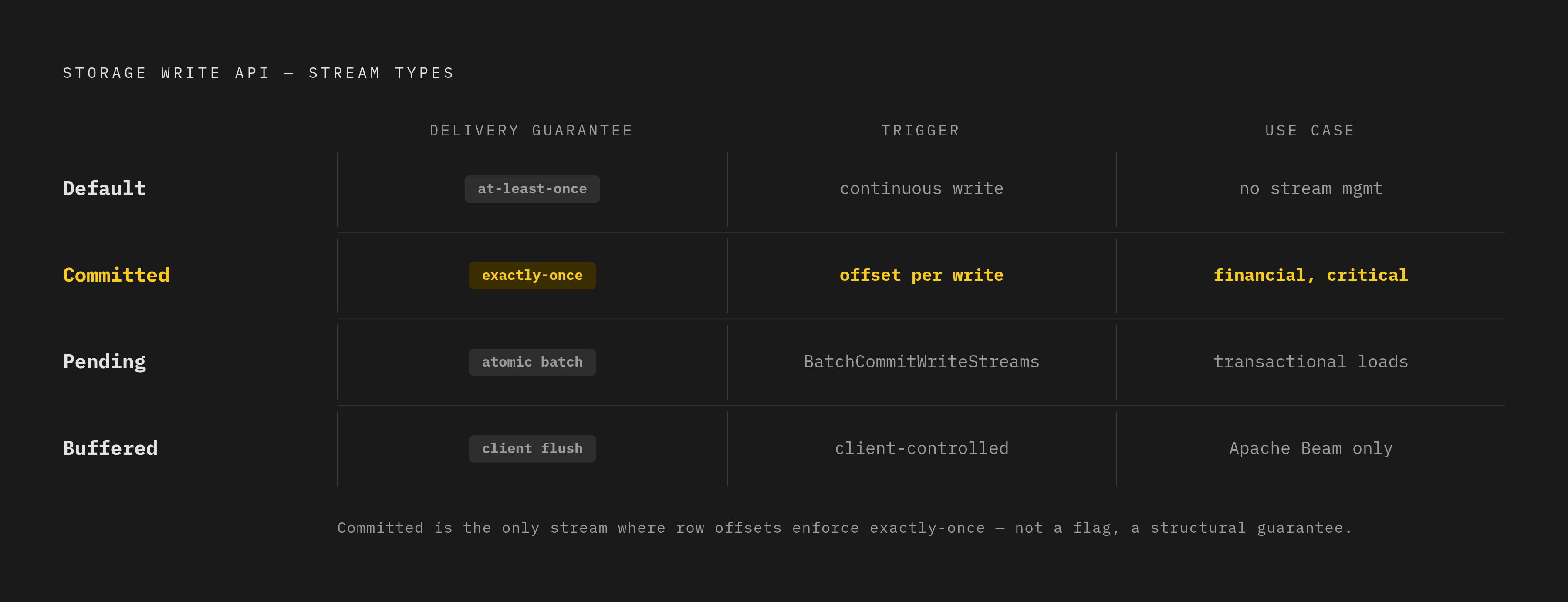
The default stream requires no explicit creation, makes data available immediately, and offers at-least-once semantics. It is designed for continuously arriving data, is the closest analogue to legacy streaming inserts, and carries fewer quota limitations and better scaling than application-created streams per Google documentation. The committed stream, an application-created stream, requires the client to supply a stream offset with each append; BigQuery rejects any write whose offset doesn't match the next expected offset. This protocol discipline, not a flag, is what delivers exactly-once semantics. The pending stream, also application-created, buffers data invisibly until the client calls BatchCommitWriteStreams; the commit is atomic, and multiple independent workers can each own a pending stream and commit together, which suits batch-style loads needing transactional atomicity. The buffered stream keeps rows invisible until the client explicitly flushes them; Google documentation notes this is intended primarily for the Apache Beam BigQuery I/O connector rather than general use. Stream multiplexing, where multiple streams write concurrently to the same table, improves throughput and reduces latency for high-velocity environments.
As a heuristic: the default stream suits simple streaming with tolerable duplicates, the committed stream suits streaming where duplicates break correctness, the pending stream serves as an atomic batch alternative to load jobs, and the buffered stream is Beam connector territory.
Cost structure: why the legacy per-row pricing model becomes expensive at scale
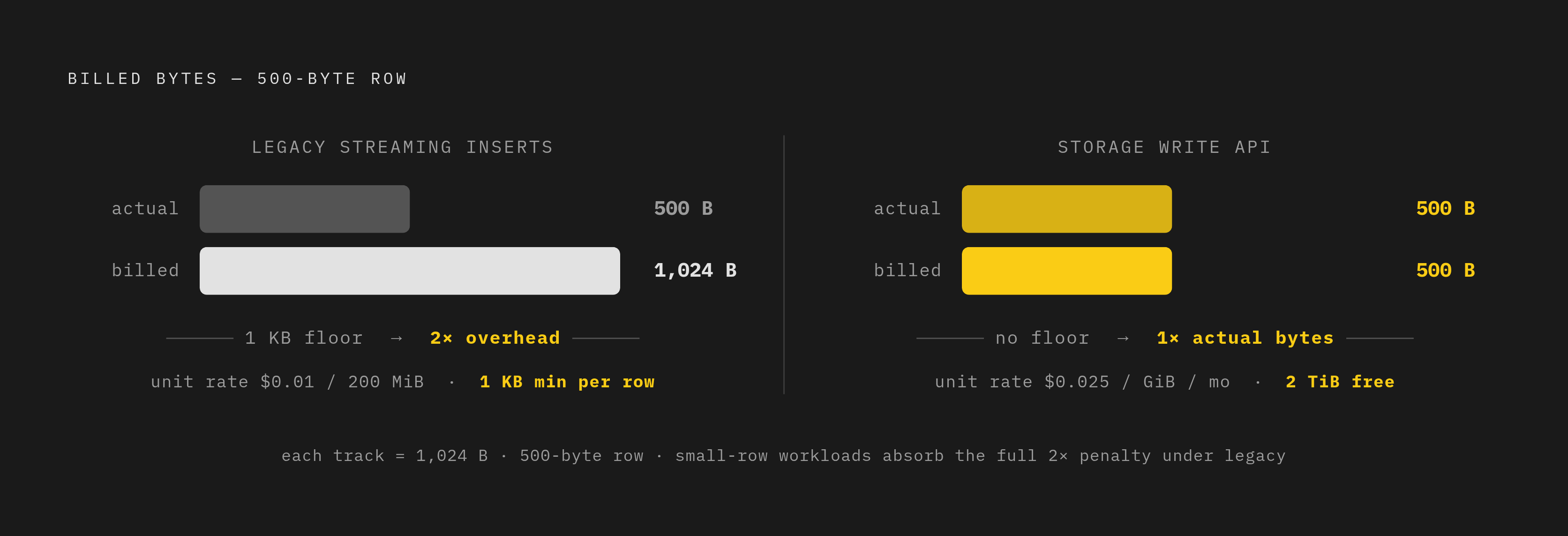
Legacy streaming inserts cost $0.01 per 200 mebibytes successfully inserted BigQuery Pricing Explained. The Storage Write API costs $0.025 per gibibyte per month, with the first 2 tebibytes of monthly throughput per account free BigQuery Pricing Explained BigQuery Write API Best Practices. On the surface legacy looks cheaper per unit, but legacy imposes a minimum billing size of 1 KB per row regardless of actual row size BigQuery Storage Write API at Scale. As a result, a 500-byte row is billed as 1 KB — roughly double the actual bytes — for small-row workloads BigQuery Storage Write API at Scale oneuptime.com. The Storage Write API, by contrast, charges on actual byte usage with no per-row minimum floor, and the 2 TiB free tier means many moderate-volume pipelines pay nothing on that side. One practitioner who migrated a production pipeline handling approximately 50 million events per day noted that for high-volume pipelines the Storage Write API represents a "massive saving" oneuptime.com. The cost advantage of legacy streaming is largely illusory for pipelines with small rows or high volume; the free tier makes the Storage Write API the default cost winner for most teams once actual row sizes are accounted for.
Delivery guarantees: what "best-effort deduplication" means in practice
Legacy streaming's insertId provides best-effort deduplication within an undocumented, non-guaranteed time window, and sources are explicit that this should not be relied on for correctness. In practice it is at-least-once delivery with no reliable mechanism to prevent duplicates from surviving into query results. The Storage Write API's default stream is also at-least-once, but with better data resiliency and fewer scaling restrictions than legacy per Google documentation. Its committed stream, using offsets, achieves exactly-once semantics: BigQuery never writes two messages with the same offset within a stream, and because the client controls the offset, retries on uncertain failures cannot double-write. Any pipeline where a duplicate row causes a problem — financial transactions, billing-relevant event counts, CDC upserts — cannot safely rely on legacy streaming or the default stream, and needs a committed stream with explicit offset management. Error handling also differs: legacy streaming returns per-row errors in the HTTP response, while the Storage Write API uses gRPC streams with flow control and structured error propagation, giving retry logic a better surface to work with.
Throughput ceilings and the quota behaviors that bite production pipelines
Legacy streaming throughput is capped at 1 GB/sec per project in US/EU multi-regions and 300 MB/sec in other regions — project-level hard caps, not per-table BigQuery Data Ingestion Methods Tradeoffs. Its per-request limits are 10 MB HTTP request size, a 10 MB per-row size limit, and up to 50,000 rows per request oneuptime.com oneuptime.com. Data is typically available 1–3 seconds after a legacy insert BigQuery Data Ingestion Methods Tradeoffs. The Storage Write API offers higher throughput quotas over long-lived gRPC connections; a single connection generally supports at least 1 MBps and often more, and throughput can scale further with multiple streams or multiplexed default-stream connections. A quota trap worth flagging explicitly: exceeding 40–50 CreateWriteStream calls per second causes API call latency to grow substantially, above 25 seconds, per Google's own best practices documentation oneuptime.com BigQuery Write API Best Practices. Teams that naively spin up a new write stream per batch or micro-batch window will hit this ceiling without understanding why latency explodes; the fix is stream reuse and connection pooling. For spiky workloads, Google documentation advises smoothing load on the client side, and where that isn't possible, pipelines must be prepared to handle 429 (resource exhausted) errors during throughput spikes. Write requests are asynchronous with guaranteed ordering, which matters for CDC and event sequencing.
Schema evolution: how each API handles table schema changes mid-stream
Legacy streaming offers no native notification mechanism when the destination table's schema changes; the result can be silent failures or a need for pipeline restarts. The Storage Write API, by contrast, notifies the client if the underlying table schema changes mid-stream, and the client can then reconnect using the updated schema or continue on the existing connection. This notification-and-reconnect model is not automatic schema migration — it is a signal the client must handle, and pipelines without that handler will see failures. For CDC mode, composite primary key support extends to up to 16 columns, relevant for teams planning native CDC ingestion on wide tables oneuptime.com. One common mistake worth naming explicitly: on a Postgres source, using REPLICA IDENTITY FULL should be a last resort reserved for tables without a unique identifier, since with BigQuery as the destination, FULL can break streams for wide tables because Datastream uses the logged columns as the logical key for merge operations. The Storage Write API's schema notification is strictly better than legacy's silence, but it still requires deliberate client-side handling, and teams that treat schema evolution as automatic will be surprised.
Native BigQuery CDC ingestion: what the Storage Write API makes possible that legacy streaming cannot do
Before native CDC support, handling updates and deletes required staging to a temp table and running MERGE statements — manual, fragile, and operationally expensive. Native BigQuery CDC requires the Storage Write API's default stream, protobuf format (Apache Arrow is not supported for CDC), and primary keys declared on the destination table. The _CHANGE_TYPE pseudocolumn accepts only UPSERT or DELETE, a simple and explicit contract between the pipeline and BigQuery's merge logic. A critical caveat: if CDC row modification operations fail, the pipeline may unintentionally retain data it intended to delete — not a theoretical edge case, but one requiring explicit failure handling and alerting. With active CDC, BigQuery applies all streamed row modifications up to query start time before returning results, which increases query latency and cost, though teams that don't need fully current results can set the max_staleness option to reduce this overhead. Legacy streaming cannot participate in native CDC ingestion at all — the point where the decision stops being a tradeoff and becomes a requirement.
Source database mechanics that shape which ingestion path you can use
On PostgreSQL, logical replication works via WAL using replication slots and publications; the critical operational risk is replication slot WAL bloat, since if the CDC consumer falls behind or disconnects, the slot prevents Postgres from cleaning up old WAL segments and can fill disk in hours Debezium vs Airbyte vs Fivetran vs Stitch vs Bladepipe. AlloyDB paired with Datastream reached general availability in 2026, enabling continuous replication to BigQuery and to Iceberg tables directly from AlloyDB, positioned for real-time ML feature engineering. On MongoDB, change streams require replica set configuration, oplog window sizing, and resume token management; a streaming pipeline template publishes change stream data to a message queue, which is then read and written directly to BigQuery, optionally using the Storage Write API. DynamoDB Streams requires attention to stream view types, shard iteration, and routing, typically passing through intermediary compute or streaming services before reaching BigQuery. The gRPC constraint matters across all of this: the Storage Write API has no REST endpoint, so systems that can only speak REST cannot call it directly. A REST bridge resolves this by accepting REST publishes and routing to BigQuery via a subscription that internally uses the Storage Write API.
Migration path from legacy streaming inserts to the Storage Write API
The recommended approach is a phased dual-write migration, not a hard cutover. There are four phases: dual-write, sending data to both the legacy API and the Storage Write API simultaneously; validate, comparing row counts and data quality between the two paths; switch, routing all traffic to the Storage Write API; and clean up, removing the legacy streaming code. The default stream is the recommended starting point for migration, since it has similar write semantics to legacy streaming but with greater data resiliency and fewer scaling restrictions per Google documentation. One interface change to plan for: legacy uses REST/JSON with insert_rows_json(), while the Storage Write API uses gRPC with Protocol Buffer serialization, requiring a proto schema that matches the BigQuery table schema and generated client code. For high throughput, the production pattern is to initialize the writer once and reuse it through connection pooling rather than creating a new write stream per request — the behavior that triggers the CreateWriteStream quota wall described above oneuptime.com BigQuery Write API Best Practices. Retry logic also needs to change: legacy streaming returned per-row errors inline, while Storage Write API errors propagate through the gRPC stream, so pipelines need explicit retry with exponential backoff; the pending stream type allows safe retries because a failed commit can be retried without risk of double-write. Source implementations across languages follow the same pattern — proto schema definition, stream initialization, batched append, and response handling. Finally, if the source table schema changes during the dual-write window, the Storage Write API client will receive a notification while the legacy client will not, so teams should handle the reconnect on the Storage Write API side before decommissioning legacy.
Decision framework: matching ingestion requirements to the right path
For a new pipeline, the Storage Write API is Google's explicit recommendation; legacy streaming inserts are a legacy path with no new feature investment. If duplicates are acceptable and the simplest implementation is the priority, the default stream offers at-least-once delivery, immediate data availability, and no stream management overhead. If duplicates would break correctness — financial transactions, billing-relevant counts, CDC upserts — only a committed stream with explicit offset management delivers exactly-once semantics. If atomic batch commits across multiple workers are needed, the pending stream with BatchCommitWriteStreams offers a transactional, retryable approach that stays invisible until committed. If native CDC is required — updates and deletes applied to BigQuery tables without MERGE statements — the default stream with protobuf format and declared primary keys is the only path, since legacy streaming cannot participate. If the source system can only speak REST, route through a REST bridge into BigQuery, which uses the Storage Write API internally, rather than attempting to call the gRPC API directly from a REST-only client. And if cost is the deciding factor at high volume, the Storage Write API wins on actual-byte pricing with no per-row minimum, while legacy streaming's 1 KB minimum floor makes it expensive for small-row workloads, with the 2 TiB free tier meaning many pipelines pay nothing at all.
Sources
- How to Migrate from BigQuery Legacy Streaming Inserts to the Storage Write API
- How to Stream Data into BigQuery Using the Storage Write API
- BigQuery: Storage Write API at scale | by Brachi Packter | Medium
- BigQuery Data Ingestion Methods Explained: Batch, Streaming, and Storage Write API | Google Cloud - Community
- docs.cloud.google.com
- followrabbit.ai
- docs.cloud.google.com